Post
How Would You Design an AI Coding Agent in a System Design Interview?
Coding agents now read a repository, plan a change, edit several files, run the tests, and iterate until they pass. A full walkthrough of the design, from requirements to sandboxing to evaluation, and what an interviewer is listening for at each step.
.png)
By Codemia • August 31, 2026
18 min read
Two years ago, if an interviewer asked you to design a coding assistant, the expected answer was a fancy autocomplete. You would talk about a language model, a prompt, maybe a cache, and that was the whole system.
That question has changed. Tools like Claude Code, Cursor, and GitHub Copilot Workspace no longer suggest the next line. They read a repository, plan a change, edit several files, run the test suite, read the failure output, and try again until the tests pass. The model is still in there, but the model is now the smallest interesting part of the design. Everything that makes the thing actually work is systems engineering: context management, tool execution, sandboxing, retry logic, and evaluation.
That is exactly why it has become a good interview question. It has a clear objective, a hard constraint that forces real tradeoffs, and about six places where a candidate either demonstrates judgment or hand waves.
This article walks through how I would answer it. I am going to treat it the way you would treat any system design interview: start with requirements, get to an architecture, then spend most of the time on the parts that are genuinely difficult.
Written by Mark Qian (Codemia) in collaboration with Javin Paul of Javarevisited, where a version of it also appears. The structure follows Codemia's own Design a Code Generation Agent rubric, which is what the grading in section 11 is built on.
1. What an AI coding agent actually does
Start by drawing the line between the thing you are designing and the thing you are not designing, because interviewers listen for this.
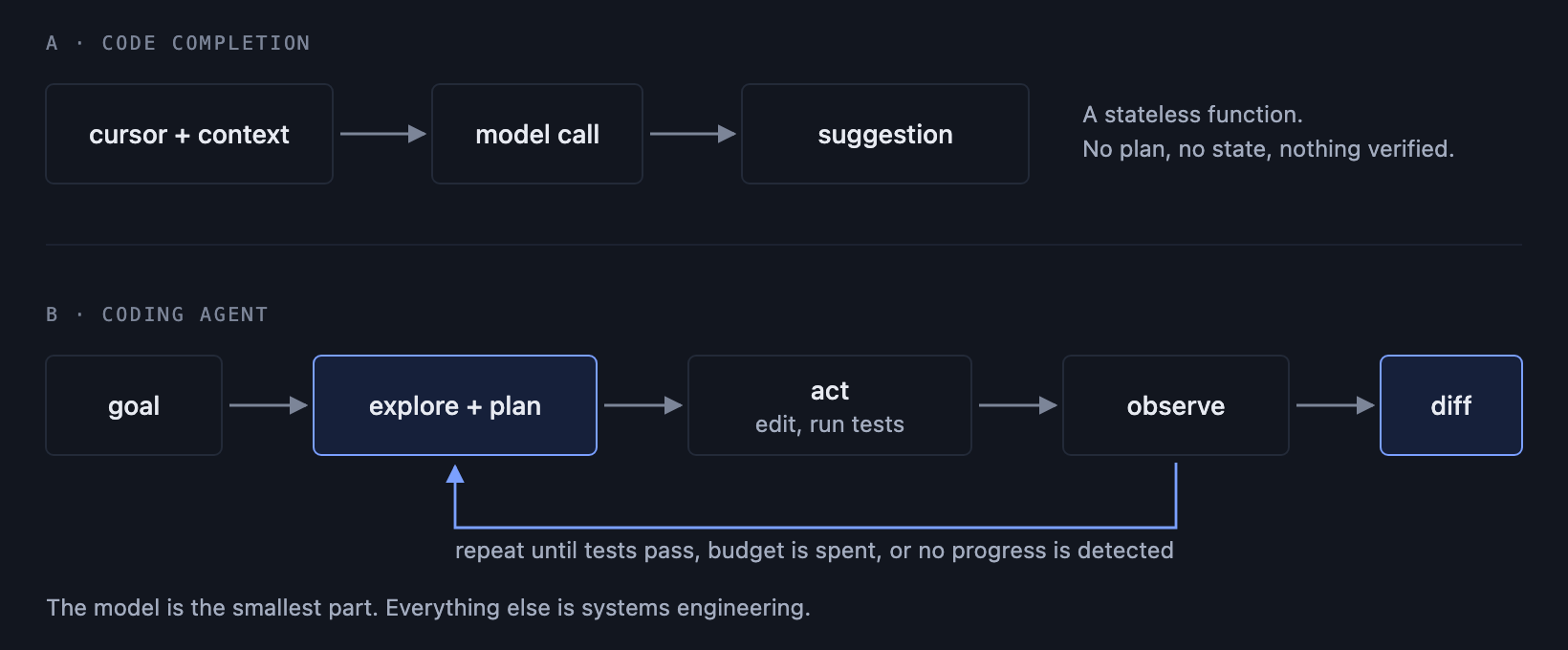
Code completion is a stateless function. Cursor position and surrounding context go in, a suggestion comes out. There is no plan, no verification, no state. If the suggestion is wrong the human notices immediately and ignores it.
A coding agent is a control loop. You give it a goal in natural language, and it decides what to do next, repeatedly, until it believes it is done. The distinction is not the quality of the model. It is autonomy, and autonomy is what forces all the infrastructure into existence.
Once the agent takes actions without a human confirming each one, you inherit a set of problems that autocomplete never had:
- It can be wrong for many steps in a row and burn real money doing it.
- It can take destructive actions, so you need isolation.
- It has to decide when to stop, which is a genuinely hard problem.
- You cannot review every step, so you need traces to debug it after the fact.
The core task loop is worth stating out loud early, because the rest of the design hangs off it:
understand the task, plan the change, write the code, run the tests, debug the failures, repeat until done or out of budget.
2. Requirements
Functional requirements
- Accept a task described in natural language, for example "add rate limiting to the payments endpoint".
- Explore an existing repository to work out what is relevant.
- Generate and modify code across multiple files.
- Execute code and tests in an isolated environment and capture the output.
- Debug its own failures and iterate.
- Produce a reviewable diff, not a commit.
Non-functional requirements
| Requirement | Target | Why it matters |
| Correctness | Pass@1 on a held out benchmark | Retrying is not free, so first attempt quality is the real metric |
| Iterations | p95 under roughly 10 debug cycles | Cost and latency both scale with this number |
| Latency | Minutes, not seconds | Users accept slowness if the result is correct |
| Cost | Bounded per task, with a hard ceiling | An unbounded agent can spend arbitrary money |
| Safety | No network, no secrets, no writes outside the sandbox | The agent runs untrusted generated code |
| Scale | Repositories in the 100K line range | This drives the entire context design |
The constraint that shapes everything
Write this on the whiteboard early:
The repository does not fit. It is not close to fitting, and buying a bigger context window does not rescue you, because filling a large window is slow, expensive, and measurably degrades the model's ability to find the relevant detail.
Everything interesting in this design follows from that single line. If you take one thing into the interview, take that.
The autonomy boundary
Say this explicitly, because it is the decision that makes the safety story coherent:
The agent is fully autonomous inside the sandbox. A human reviews before anything merges.
That single sentence buys you a lot. It means the agent can be aggressive, retry freely, and make mistakes cheaply, because nothing it does reaches production without a person approving a diff. Pair it with an explicit list of things the agent can never do: no network access, no access to real credentials, no writes to the real repository.
3. The core agent loop
Four layers, and the ordering matters:
The most common mistake here is making the orchestrator an LLM. It should be ordinary deterministic code. Retry limits, timeouts, budget enforcement, and termination conditions are all things you want to be exactly correct and easy to test. Do not ask a language model to enforce your spending cap.
ReAct, and why it is not enough on its own
The standard pattern is ReAct: reason, act, observe, repeat.
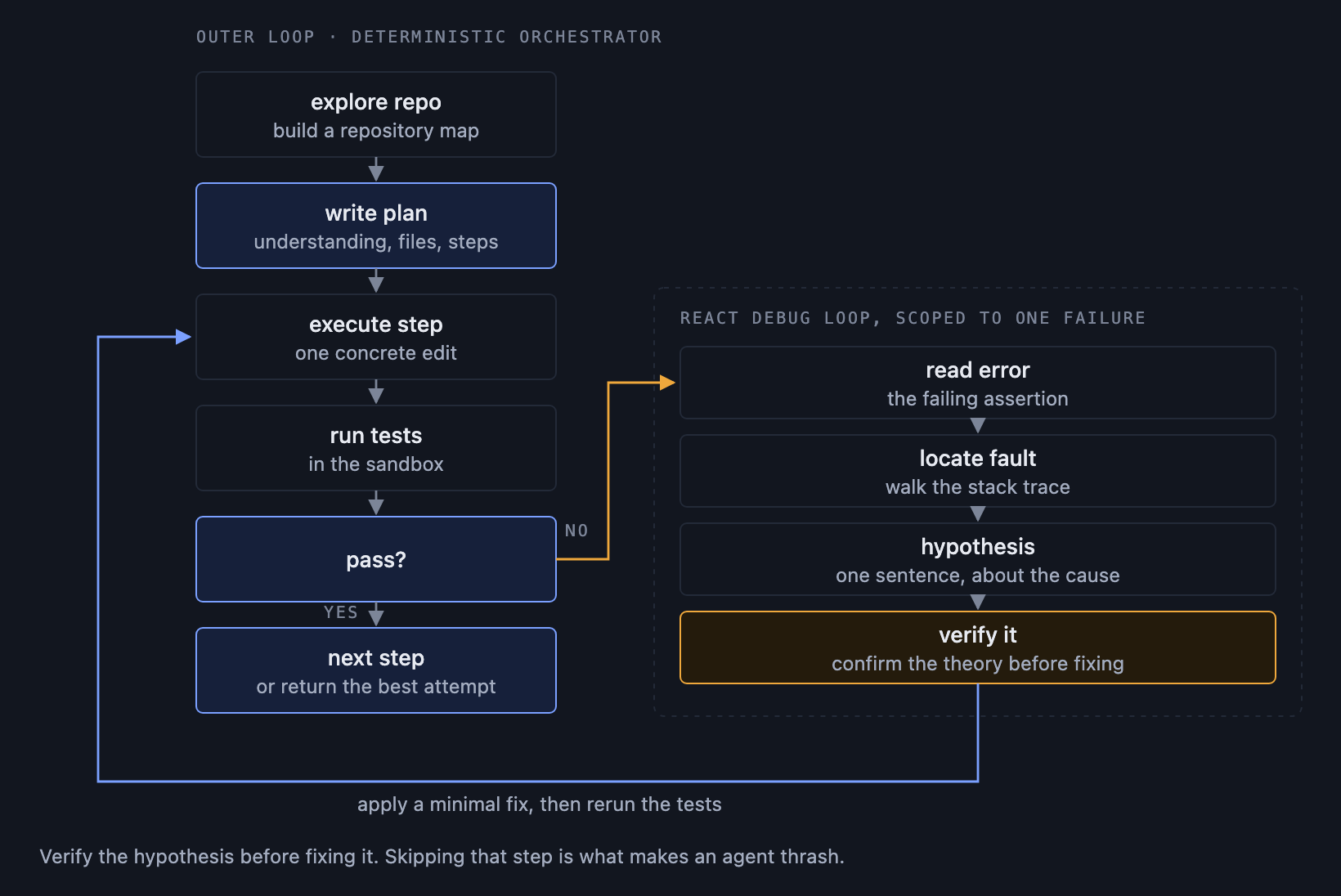
This works well for debugging, where each step genuinely depends on what the last one revealed. It works badly as the top level strategy, because a pure ReAct agent has no plan. It wanders, it revisits files it already read, and it has no way to tell whether it is making progress.
The better answer, and the one I would give, is plan then execute, with ReAct only in the debug loop:
- Explore the repository and build understanding.
- Produce an explicit written plan.
- Execute the plan step by step.
- When something fails, drop into a ReAct debug loop for that failure.
- Return to the plan.
The plan is worth making structured rather than freeform. Ask the model for fixed sections:
Structure here does real work. It gives you something to show the user before you start spending money, it makes the agent restate the task so misunderstandings surface early, and AFFECTED FILES becomes a checkable artifact rather than a vague intention.
Single agent or multi-agent?
Interviewers often push on this, hoping you will propose a swarm of specialists: a planner agent, a coder agent, a reviewer agent.
Resist it, and be able to say why. A single agent is the better default because all the state lives in one place. The moment you split into multiple agents you have to serialize context between them, you pay for the same tokens repeatedly, and you introduce coordination failures where the coder and the reviewer disagree about what the task even was. A modern model is already multi skilled. It does not need to be split into personalities to plan and to code.
Multi-agent earns its keep when subtasks are genuinely independent and can run in parallel, for example migrating forty unrelated files. That is a real case. It is not the default case.
Knowing when to stop
Five conditions, and an agent missing these is an agent that runs forever:
- Tests pass. This is the success case.
- Retry limit hit.
- Wall clock timeout.
- No progress detected.
- Context exhausted.
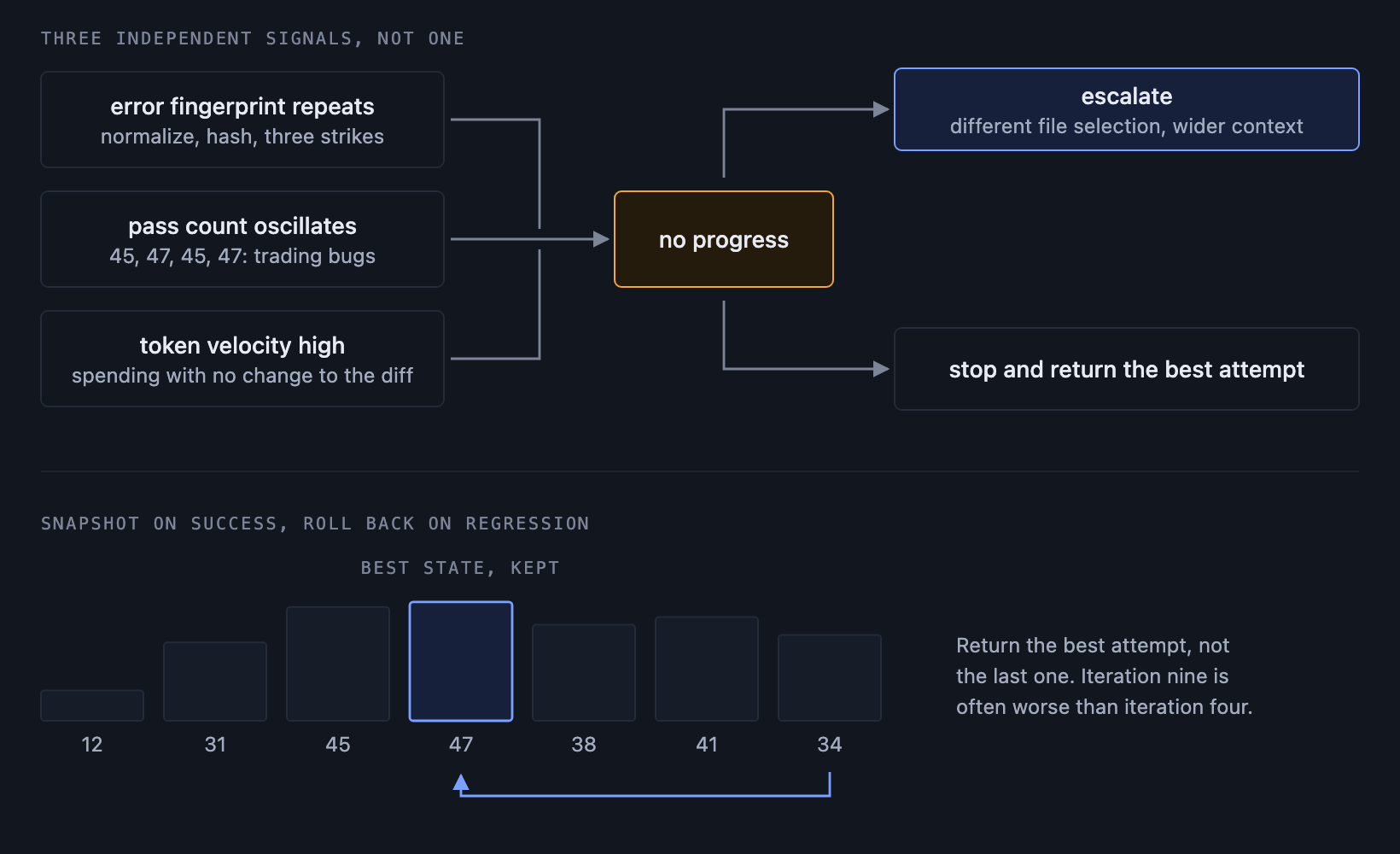
One detail that separates a thoughtful answer from an average one: return the best attempt, not the last attempt. Agents often thrash near the end, and iteration nine is frequently worse than iteration four. Track the number of passing tests at each step, snapshot the best state you have seen, and return that.
4. Understanding a large codebase
The agent needs a cheap map before it needs expensive detail.
Build a repository map on ingest: directory structure, detected language and framework, entry points, build and test commands, and for each file a compact summary of what it declares. Extract that summary from the abstract syntax tree rather than by feeding files to the model. An AST walk gives you every class, function signature, and import for a few milliseconds of CPU and zero tokens.
A map like that for a whole repository costs a few thousand tokens. The raw files cost half a million. The agent can now reason about structure before deciding what to actually read.
Three kinds of memory are worth naming separately, because they have different lifetimes and different compression strategies:
| Memory | Holds | Strategy |
| Codebase context | Repository map, files currently in play | Summary first, detail on demand |
| Conversation history | The agent's own steps and observations | Keep the last few turns verbatim, summarize older ones |
| Error memory | Failed attempts and their root causes | Never drop, this is what prevents loops |
Error memory is the one people forget, and it is the one that matters most. Record every failed attempt as a small structured record:
Without this, an agent will cheerfully try the same broken fix four times in a row, because each attempt starts from a context where it has forgotten the last one. With it, you can put "here is what you already tried and why it failed" directly into the debug prompt.
5. Selecting the right files for context
This is the heart of the problem, and it is where I would spend the most time in an interview.
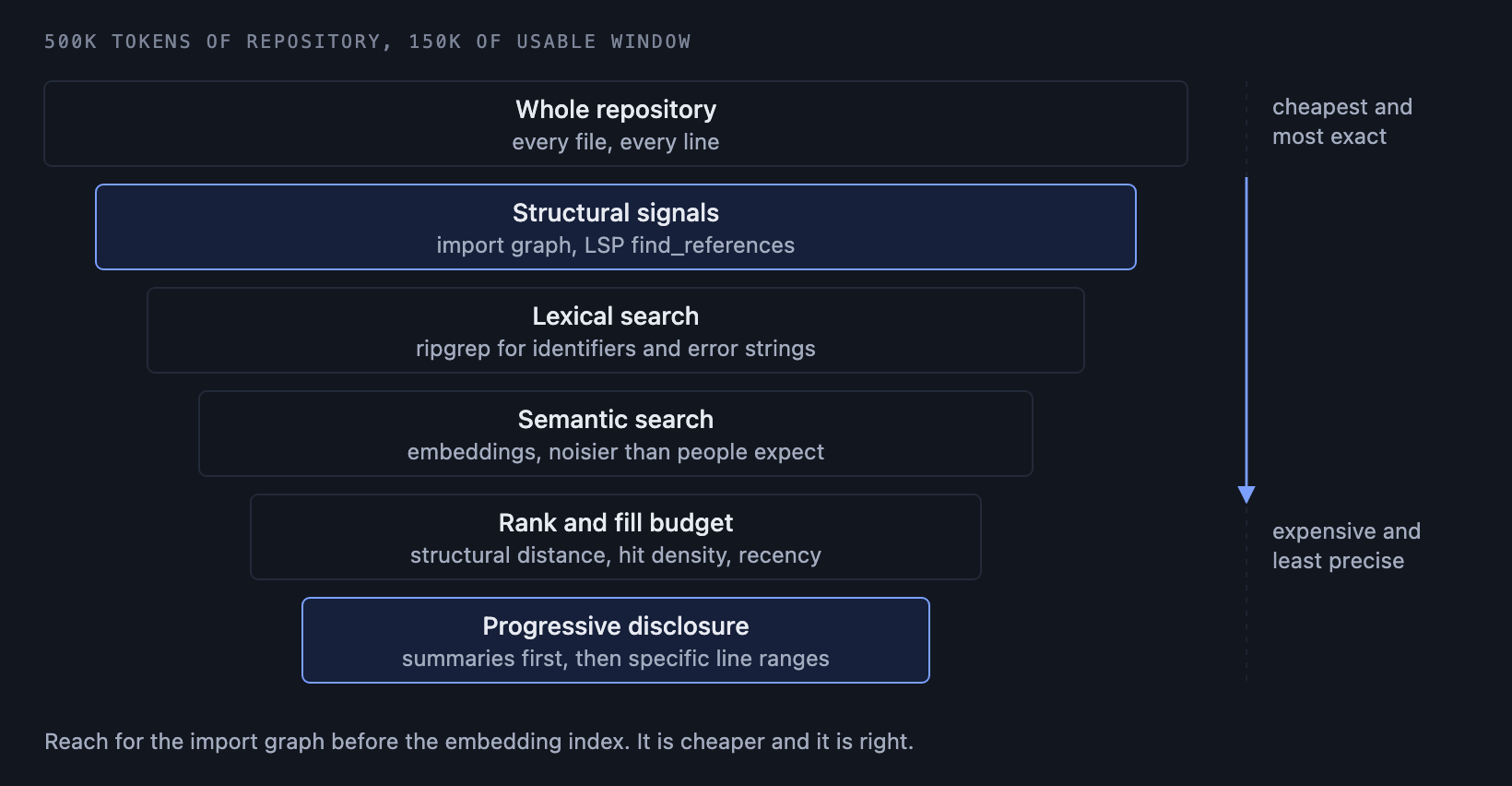
You have a budget of maybe 150K usable tokens and a repository of 500K. You need the right 30%, and you need to find it without reading everything.
A layered retrieval strategy works well:
- Structural signals. Which files does the task name? Which files import those files? An import graph or a Language Server Protocol "find references" call answers this precisely and cheaply. This should be your first tool, not semantic search.
- Lexical search. Plain regex or ripgrep for identifiers, error strings, and config keys. Fast, exact, and underrated. If the task mentions
RateLimiter, grep for it. - Semantic search. Embeddings over chunked files, for when the user describes behavior rather than naming symbols. Useful, but noisier than people expect on code, because code is full of near duplicate boilerplate that embeds almost identically.
- Progressive disclosure. Read summaries first, then read only the specific line ranges that look relevant.
That last point deserves a dedicated design decision: the file reader tool must accept a line range. A tool that only reads whole files will blow the context window on one 4,000 line legacy module. Reading lines 200 through 260 costs almost nothing.
Rank candidates by a combination of structural distance from the named files, lexical hit density, and recency of modification, then fill the budget from the top until it is full. Keep the ranking explainable, because when the agent fails you will want to know whether it failed because it never saw the right file.
6. Giving the agent tools
The tool set is the agent's entire ability to affect the world. Keep it small and make each tool sharp.
| Tool | Purpose | Design note |
read_file | Read source | Must support line ranges |
write_file | Apply an edit | Patch mode beats overwrite, it fails loudly on drift |
search_code | Find symbols and strings | Offer both regex and semantic, let the model pick |
find_references | Locate all callers | LSP backed, this is how refactors stay correct |
run_shell | Build, install, arbitrary commands | Sandboxed, timeout enforced |
run_tests | Execute the test suite | Return structured results, not raw stdout |
git_diff | Show accumulated changes | Lets the agent review its own work |
Two decisions inside this table are worth defending out loud.
Patch mode over whole file overwrite. When the agent submits a patch with context lines and the file has changed underneath it, the patch fails to apply and you find out immediately. With overwrite, the agent silently destroys edits it did not know about. Loud failure beats silent corruption.
Structured test output. Do not hand the model 8,000 lines of pytest output. Parse it and return the shape that matters:
That is perhaps 100 tokens instead of 20,000, and it is strictly more useful. Every tool needs a truncation policy for the same reason. A search that matches 900 lines should return the top 40 and say how many it dropped.
The model chooses which tool to call at each step. Do not hard code a fixed sequence, because the right sequence genuinely differs between "fix this typo" and "refactor this module". Guide the choice in the system prompt with a rough process (explore, plan, implement, verify, debug) and let the model deviate when the task calls for it.
7. Sandboxing and permission controls
You are executing code that a language model wrote, based on a prompt that may have come from an untrusted source. Treat it as hostile.
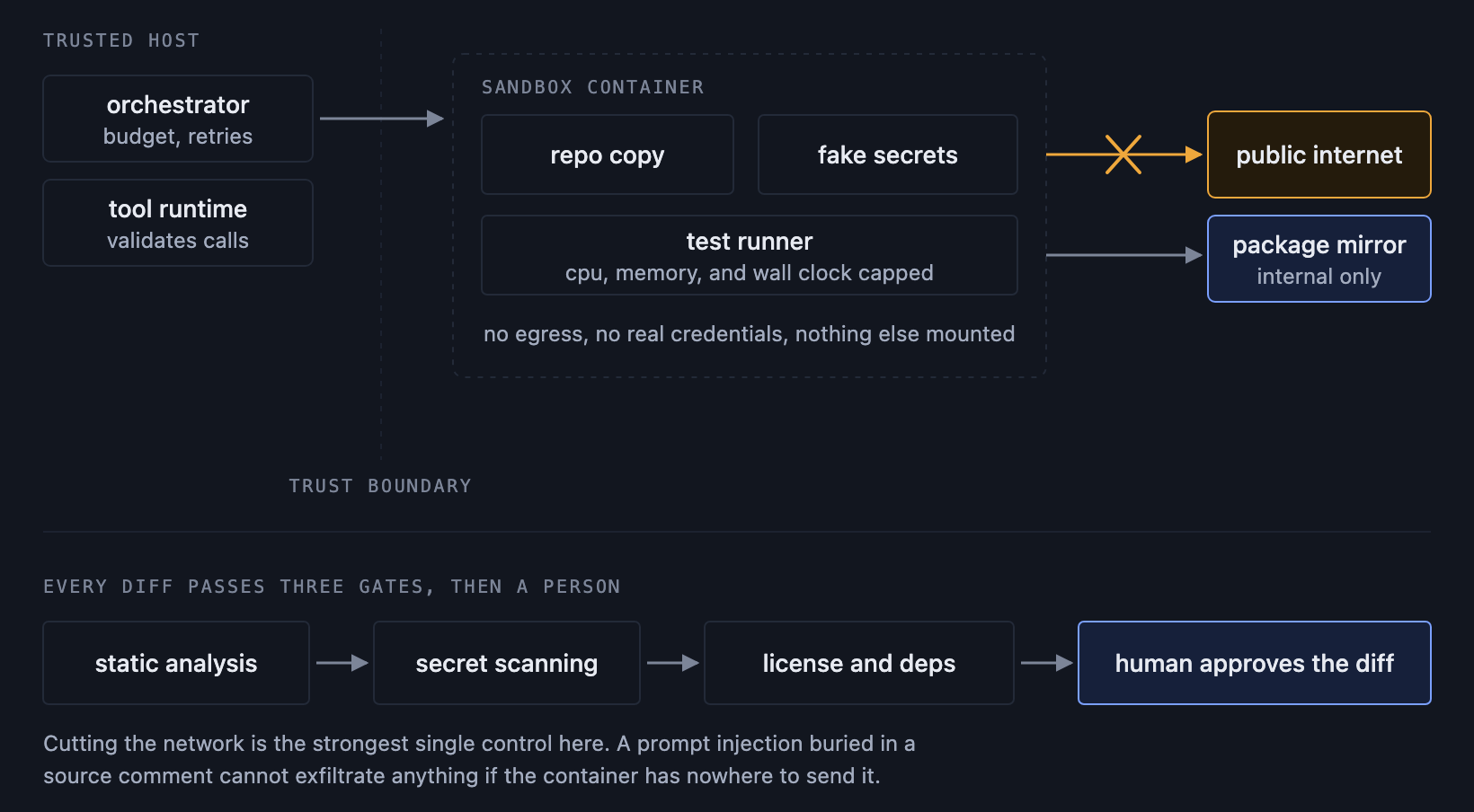
The sandbox is a container with:
- No network access. This is the single strongest control in the entire design. If the container cannot make outbound connections, then a prompt injection buried in a source file comment cannot exfiltrate your source code, no matter what it convinces the model to do. Say this explicitly in an interview, because it demonstrates you understand the actual threat model rather than reciting a security checklist.
- No real secrets. Inject fakes. If tests need a database, give them a throwaway one.
- Filesystem isolation. A copy of the repository, nothing else mounted.
- Resource limits. CPU, memory, disk, and a hard wall clock timeout, so an accidental infinite loop costs seconds rather than a machine.
No network raises an obvious problem: the agent needs to install dependencies. Solve it by pre-building sandbox images with the common toolchain already present, and running an internal package mirror that the container can reach while the public internet stays unreachable. You get pip install without giving away egress.
Before a diff reaches a human, run automated gates over it:
- Static analysis for known vulnerability patterns.
- Secret scanning, because models do occasionally write a plausible looking API key into a config file.
- License and dependency checks on anything newly added.
And then the final gate, which is the whole reason the rest of the design can be relaxed: the agent's output is a diff, and a human approves it. The agent proposes. A person disposes.
A permission tier system makes this configurable rather than absolute:
| Tier | Allowed | Use |
| Read only | Explore and explain | Code review, question answering |
| Write sandboxed | Edit and run inside the container | The default for feature work |
| Write with deploy | Push branches, open pull requests | Trusted repositories, still human merged |
8. Recovering from failed actions
Failure is the normal case, not the exception. A well designed agent fails constantly and recovers cleanly.
The structured debug loop
Freeform "the tests failed, try something" produces flailing. Give the debug step an explicit procedure:
- Read the error and identify the failing assertion or exception.
- Locate the fault, using the stack trace to find the specific line.
- Form a hypothesis about the root cause, stated in one sentence.
- Verify the hypothesis before fixing it. Read the relevant code, or add a temporary print, and confirm the theory is actually true.
- Apply a minimal fix.
- Rerun the tests.
Step four is the one that separates agents that converge from agents that thrash. An agent that skips verification is pattern matching on the error string, and pattern matching produces fixes that change the error message without fixing the bug.
Detecting a stuck agent
An infinite debug loop is the most expensive failure mode, because the agent looks busy the entire time it is wasting your money. Detect it with three signals rather than one:
- Error fingerprint repetition. Normalize the error (strip line numbers and memory addresses, keep the type and message shape) and hash it. The same fingerprint three times means no progress.
- Pass count oscillation. If the number of passing tests goes 45, 47, 45, 47, the agent is trading one bug for another.
- Token velocity. Lots of tokens spent with no change in the diff means the agent is thinking in circles.
When any of these fires, escalate rather than continue: expand the context with a different file selection, or stop and return the best attempt with an explanation.
Cascading regressions
The nastiest failure is when a fix for the target test breaks four unrelated ones. Two defenses, used together:
- Snapshot on success. Every time the passing test count increases, save the state. If a later change makes things worse, roll back to the last good snapshot instead of trying to dig out.
- Blast radius awareness. Before editing a shared function, call
find_references. If it has thirty callers, that is information the agent needs before it changes the signature.
Also handle the boring infrastructure failures, because interviewers notice when you do. Model providers return 503s, so have a fallback chain and a circuit breaker. Sandboxes die, so checkpoint and resume. Test runs pick up stale build caches, so clear them before each run.
9. Evaluating whether the generated code is correct
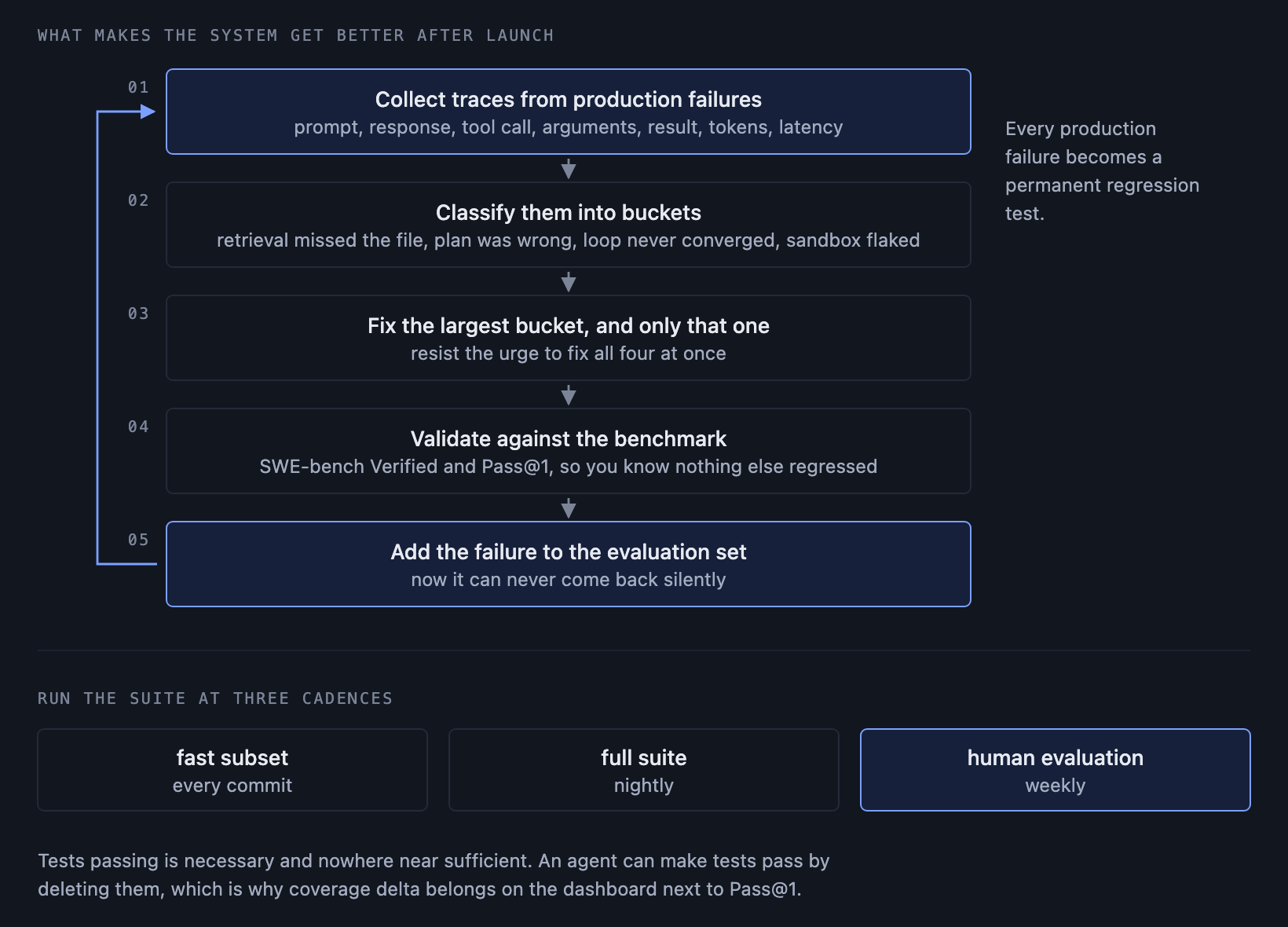
"The tests pass" is necessary and nowhere near sufficient. The agent can make tests pass by deleting them.
Benchmarks
Use established ones so your numbers mean something to other people: HumanEval and MBPP for isolated function generation, SWE-bench and SWE-bench Verified for real repository tasks drawn from actual GitHub issues. SWE-bench Verified is the more honest signal, because it is human validated and the tasks look like real work.
Metrics
Pass@1 is the metric that matters for a production agent. Pass@10 is interesting for research, but a user who has to run your agent ten times to get one working answer does not have a working product.
Beyond correctness, track:
- Iteration count distribution, not just the mean. The tail is where your costs live.
- Human approval rate on generated diffs. This is your real quality metric, because it measures whether a person would ship the code.
- Static analysis pass rate.
- Test coverage delta, which catches the agent quietly deleting inconvenient tests.
- Cost and token consumption per task.
Run these at three cadences: a fast subset on every commit, the full suite nightly, and a heavier human evaluation weekly.
The improvement flywheel
This is the part that makes the system get better over time, and it is worth describing because it shows you have thought past launch:
- Collect traces from production failures.
- Classify them into buckets: retrieval missed the file, plan was wrong, debug loop never converged, sandbox flaked.
- Fix the largest bucket, and only the largest bucket.
- Validate the fix against the benchmark so you know you did not regress something else.
- Add the failure to the evaluation set so it can never silently come back.
Which brings up observability. Every step needs a trace record: the exact prompt sent, the model's response, the tool called, the arguments, the result, tokens consumed, and latency. When an agent does something inexplicable, the trace is the only way to find out why. Without it you are debugging a black box by rerunning it and hoping.
10. Cost, latency, and reliability tradeoffs
A few conclusions that are not obvious until you have measured them.
Debug iterations dominate cost. Planning is one call. Initial generation is a few. Debugging can be twenty, each carrying an ever growing context. If you want to make the agent cheaper, do not optimize the planning prompt. Reduce the number of debug cycles, which usually means improving file selection so the first attempt is better informed.
Cost scales with files touched, not lines written. A one line change spread across six files costs far more than a two hundred line change in one file, because every one of those files has to be read, held in context, and re-read after edits.
Temperature 0 for code and debugging. You want determinism where correctness is binary. A small amount of sampling during planning, in the 0.2 to 0.4 range, can help the agent consider more than one approach, but generation and debugging should be deterministic.
Prompt chaining beats one giant prompt. Separate calls for explore, plan, generate, and debug each get a focused system prompt and a context containing only what that step needs. It is cheaper and the outputs are better.
Latency is mostly acceptable. This is the pleasant surprise. Users will happily wait four minutes for a correct patch. They will not wait forty seconds for a wrong one. Optimize for correctness first and let latency be what it is, within reason.
Here is the summary table I would draw:
| Lever | Improves | Costs |
| Larger context | Fewer retrieval misses | Higher token cost, slower, worse recall in the middle |
| More debug iterations | Higher eventual pass rate | Cost grows fast, diminishing returns after roughly 5 |
| Stronger model | Better first attempt | Higher per call price, usually cheaper overall |
| Parallel exploration | Lower latency | More tokens spent, some of it wasted |
| Aggressive summarization | Fits more in context | Loses detail, may drop the crucial line |
11. How to practise Agentic AI system design
The uncomfortable thing about this category of question is that reading a solution feels productive and mostly is not. You will nod along at "use error memory to prevent debug loops" and then fail to produce it under interview pressure three weeks later, because recognizing an idea and generating it are different skills.
The only reliable fix is to write the design yourself, cold, and then find out what you missed.
If you want to do that with this specific problem, Codemia has it as a hands on challenge. Design a Code Generation Agent is one of its medium difficulty Agentic AI problems, and it is free. You write your design in the editor and get structured AI feedback against a rubric covering agent requirements, tool design, memory design, architecture, execution flows, reasoning, safety and permissions, observability, failure modes, and evaluation. The feedback tells you which specific points you covered and which you missed, section by section, which is considerably more useful than a score.
There are seventeen other agentic problems alongside it if you want the breadth: research agents, customer support agents, multi-agent orchestration, autonomous testing, and a few genuinely hard ones.
Whether you use that or a whiteboard and a friend, the practice pattern is the same. Write the design first. Compare second. The gap between the two is your actual study list.
Closing thought
If you get this question, resist the pull toward the model. The interviewer is not testing whether you know which LLM is best this month. They are testing whether you understand that an autonomous system needs bounded budgets, isolated execution, structured retries, a definition of done, and a human at the end of it.
Get the 500K tokens into a 200K window problem on the board early, be honest that failure is the normal case, and design for recovery rather than for perfection. That is the answer that sounds like someone who has actually built one.