Post
NUMA Is the New Network: How Per-Socket Memory Models Are Reshaping Microservice Placement
This article explores how Non-Uniform Memory Access (NUMA) is reshaping microservice placement. It traces the evolution from early SMP kernels to modern Linux features like cgroups v2 and eBPF locality hints, and highlights Kubernetes topology-aware scheduling. Real-world data shows that aligning pods and stateful services with NUMA nodes can significantly reduce tail latency and improve throughput, making NUMA awareness as critical as network awareness in distributed system design.
.png)
By Codemia • August 17, 2025
5 min read
From SMP to NUMA: Early Multiprocessor Memory Bottlenecks
In the early days of multiprocessor servers, Symmetric Multiprocessing (SMP) systems used a single, shared memory pool accessible to all CPUs via a common bus (often through a northbridge or memory controller hub). This uniform memory access (UMA) meant any CPU could reach any memory location with the same latency. However, as more CPUs were added, the single memory bus became a critical bottleneck – only one processor could effectively access memory at a time, causing contention as CPUs waited for the bus. In an SMP machine with dozens of CPUs, the memory subsystem could starve multiple processors simultaneously while servicing one, leading to poor scalability. The limitation was fundamental: increasing CPU speed and count outpaced memory speed, and a lone shared memory channel couldn’t keep up.
To overcome this, computer architects introduced Non-Uniform Memory Access (NUMA) designs. NUMA breaks the single memory choke-point by giving each CPU (or socket) its own local memory, and connecting the sockets via high-speed interconnects. Instead of all CPUs contending for one memory bus, each NUMA node (socket) handles memory access for its local DIMMs, and CPUs use an inter-node link to reach memory attached to other sockets. This dramatically improves overall bandwidth at the cost of non-uniform latency – local memory is faster to access than remote memory. Figure 1 illustrates a simple NUMA architecture: two CPU nodes each with their own memory, interconnected by a directory-based coherence network (allowing the two memory banks to function as a single address space with cache coherence).
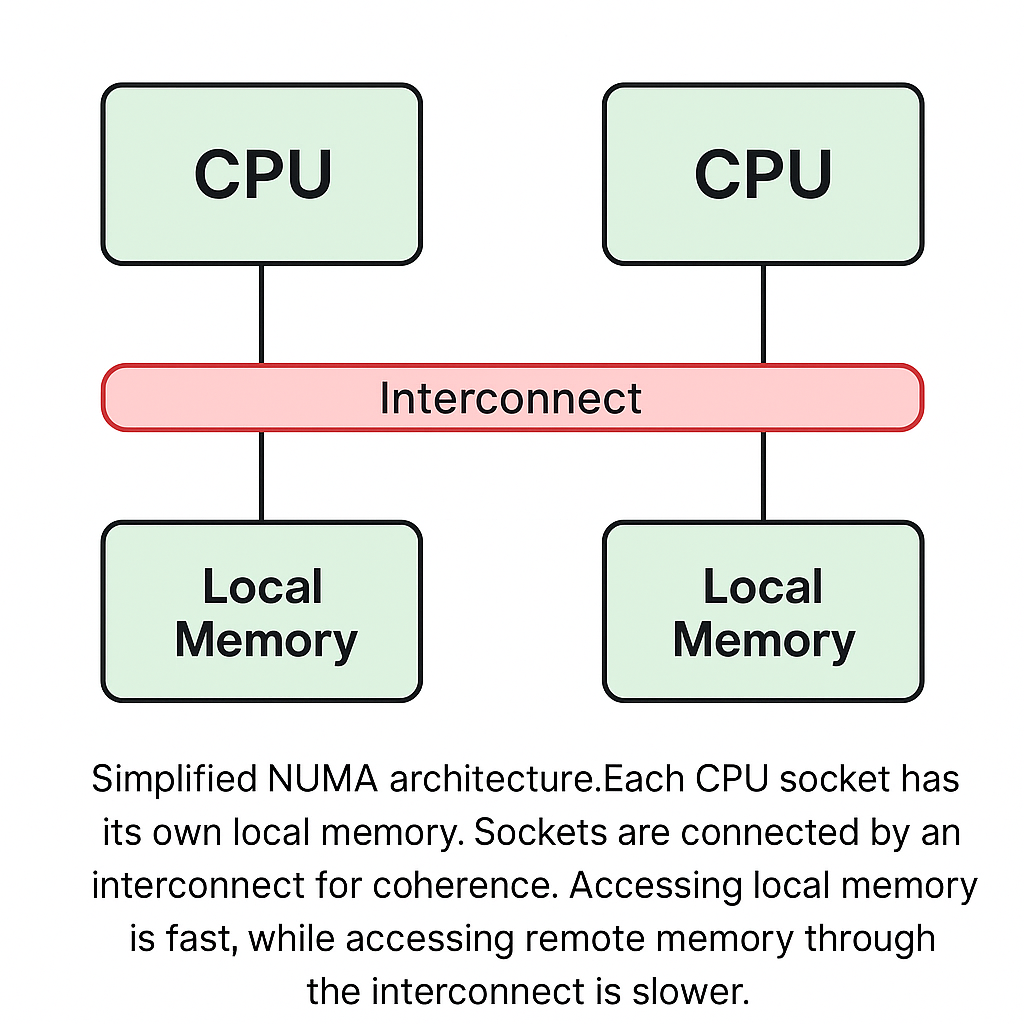
Figure 1: Simplified NUMA architecture – each CPU socket (node) has its own local memory (green), and sockets are connected via an interconnect (red directory-based network) for coherence. Local memory access (within one node) is faster and higher priority, while remote memory access goes through the interconnect and incurs extra latency.
Rise of NUMA: Memory Latency Variance Across Sockets and Cores
NUMA architectures became the norm in modern servers because they address the scalability limits of SMP. In a NUMA system, memory access latency depends on the proximity of the memory to the CPU core requesting it. A processor can access its local node’s DRAM with lower latency and higher bandwidth, whereas accessing remote memory (memory attached to a different socket or die) is slower due to the traversal over the interconnect. In practical terms, this means not all “RAM access” times are equal: modern multi-socket CPUs exhibit significant latency variance. For example, local memory latency might be on the order of 90–100 nanoseconds, whereas remote memory accesses can take 150–300 ns – a substantial difference of 1.5×–3× in latency. Similarly, memory bandwidth to local DIMMs is higher than to another socket’s memory because the inter-socket link (such as Intel UPI or AMD Infinity Fabric) limits throughput.
This non-uniformity isn’t limited to separate motherboards; it occurs within single servers. A typical 2-socket server shows ~2× latency penalty for cross-socket memory access (as reflected in Linux’s NUMA distance metrics, e.g. “node distance” 10 for local vs 20+ for remote). Even within a single socket, modern CPU designs with multiple chiplets or memory controllers can exhibit NUMA-like characteristics – for instance, an AMD EPYC processor may present multiple NUMA domains on one package, each with local memory. The result is a complex memory topology where the “closest” memory for a core is the local NUMA node’s, and using memory from a different node introduces what is effectively a locality penalty.
Crucially, what this means for software is that memory access patterns start to resemble network access patterns in their variability. A remote memory fetch might cost an extra 100+ nanoseconds – negligible in human time, but on the order of hundreds of CPU cycles (comparable to dozens of intra-datacenter network round-trips at the packet level). The growing gap between CPU speed and memory access across NUMA domains has made “far memory” akin to a mini network hop inside the server. System designers now must treat memory locality as a first-class concern, much as they treat network latency between distributed services.
Microservice Performance and Memory Locality
The shift to NUMA has direct implications for microservices and stateful applications. In a microservice architecture, we often focus on network calls between services as the main source of latency. But when services run on multi-socket servers (as VMs or containers), cross-socket memory access can become an equally important contributor to latency and throughput variability. For example, if a microservice’s process runs on a CPU in socket 0 but frequently accesses data that the OS allocated in socket 1’s memory, each of those memory accesses pays a remote penalty. In high-throughput, low-latency services (databases, caches, analytics engines), those penalties accumulate and can degrade both average and tail performance.
Consider a distributed in-memory cache like Redis. Redis is a single-threaded, memory-speed-bound service. On a dual-socket machine, if the Redis server process and its client happen to be scheduled on different NUMA nodes (or if the server’s memory is on the opposite node from its CPU core), you might see non-deterministic latency and throughput. In fact, engineers observed that Redis benchmark results fluctuated significantly on a multi-socket system when the workload was not NUMA-aligned, because client-server interactions and memory accesses were incurring remote access delays. Once the processes and memory were pinned to the same NUMA node, throughput became consistent. In essence, an unpinned Redis could experience performance jitter reminiscent of a networked setup (with the “network” in this case being the inter-socket memory link).
Stateful services like databases (SQL/NoSQL stores) or coordination services (e.g. etcd) are particularly sensitive to memory locality. These systems often rely on fast in-memory operations with tight latency budgets. etcd, for instance, must respond to heartbeats and quorum writes quickly; any unforeseen latency (be it CPU starvation or remote memory delay) can cause timeouts or instability. Ensuring such a service runs on a single NUMA node with its memory local helps avoid unpredictable stalls. Research and experience show concrete benefits: keeping an application’s threads and memory on the same NUMA node can improve throughput by around 5–10% compared to a cross-node setup in many cases, and it significantly reduces tail latency outliers. This is because the worst-case memory access (which often determines the 99th percentile latency for a request) is much faster when it doesn’t cross an NUMA boundary.
Even within a single service, if threads or containers of a pod are split across NUMA nodes, their communication and memory sharing will suffer extra latency. In a distributed microservice deployment, we typically worry about network hops between services; with NUMA, we must also worry about “memory hops” within the same machine. A useful mental model is to treat different NUMA nodes similarly to different physical servers: communicate within the same node whenever possible, and only go “off-node” (remote memory or remote CPU access) if absolutely necessary. The title “NUMA is the new network” reflects this emerging wisdom – for high-performance microservices, crossing NUMA nodes is akin to making a network call to another service in terms of performance impact.
Linux Kernel Support for NUMA: Balancing and Affinity
Operating systems have evolved to help manage NUMA complexity. In Linux, early NUMA-capable kernels provided basic APIs for NUMA-aware programming (e.g. mbind, sched_setaffinity) and simple policies like first-touch allocation (memory is allocated on the NUMA node of the CPU that first touches it). Over time, the kernel gained Automatic NUMA Balancing to optimize memory placement without explicit application hints.
Automatic NUMA balancing (introduced in Linux 3.8 and improved in subsequent releases) works by monitoring a process’s memory access patterns and proactively migrating memory pages or moving tasks to reduce remote accesses. In simple terms, the kernel sets up hinting page faults: it periodically unmaps some pages of a process so that when the process accesses those pages, a page fault occurs, letting the kernel record which CPU (which NUMA node) is accessing the page. The kernel then uses this info to decide if a page should be migrated to the node of the accessing CPU (if the memory is currently on a different node). Similarly, the scheduler might migrate the process to follow its memory if that’s more efficient. Over time, this should converge so that a process’s hot pages reside on the NUMA node(s) where the process runs, achieving locality. The kernel also tries to group together tasks that heavily share memory so they run on the same NUMA node (reducing bouncing of shared data). Automatic NUMA balancing is enabled by default on most modern Linux distributions, since it can dramatically boost performance for NUMA-heavy workloads without manual tuning.
That said, auto NUMA balancing has overhead – those hinting page faults and migrations cost CPU cycles and memory bandwidth. In cases where an application or administrator has already optimized NUMA usage (e.g. via manual pinning), the automatic mechanism can be a net negative. It can be turned off via sysctl kernel.numa_balancing=0 if needed. In many high-performance scenarios, manual control is preferred. Linux provides several ways to bind processes or memory to specific nodes: the numactl tool, sched_setaffinity for CPU pinning, and the cpuset cgroup controller for containing a process to a set of CPUs and memory nodes. For example, one can launch a process so it only uses NUMA node 0 resources:
The above ensures my_app doesn’t inadvertently allocate memory on a remote node or migrate to other CPUs. At the kernel level, using cpusets achieves a similar effect by restricting a cgroup’s cpuset.cpus and cpuset.mems to the desired node IDs.
Beyond these userland controls, Linux is gaining more nuanced NUMA-aware optimizations. The advent of cgroups v2 unified hierarchy allows better integration of NUMA policies with container management – for instance, a container’s cgroup can be configured to limit memory allocation to specific NUMA nodes, so the kernel’s scheduler and pager will respect those boundaries. Efforts have been made to make the automatic NUMA balancer cgroup-aware (so it doesn’t fight container pinning), ensuring that kernel decisions align with higher-level orchestration constraints.
Another frontier is the use of eBPF (extended Berkeley Packet Filter) to inject custom logic for scheduling and memory management. Recent Linux versions have introduced a framework for writing scheduler policies in eBPF (the sched_ext module). This allows organizations like Meta and Google to implement their own scheduling strategies in the kernel, without rebuilding it – for example, a policy that keeps specific workload threads on the same NUMA node, or that avoids migrating tasks if their memory is not migrated yet. The flexibility is huge: one could write an eBPF program to provide locality hints to the scheduler, say, by marking a thread as NUMA-sensitive so it should only run on a particular node. In fact, one rationale for the eBPF scheduler extender was that generic kernel policies can’t fit all workloads; some applications see performance regressions when threads move across NUMA domains and lose warm cache. By using eBPF, operators can codify “stay on this socket for better cache locality” or other hints as custom rules. While this is cutting-edge (Linux 6.7+ timeframe) and not widely used in production yet, it shows how programmable scheduling is taking NUMA-awareness to the next level. The kernel is effectively opening up an API for locality-aware scheduling policies.
Linux kernel advancements also include finer-grained memory controls. For instance, there are proposals and prototypes to allow user space to influence page placement via hints (e.g., using madvise to prefer a certain node for an allocation) and to better handle tiered memory (fast local RAM vs slower remote or persistent memory). All these features aim at the same goal: minimize the frequency and cost of remote memory accesses by keeping computations and their data close together. As we’ll see, container orchestration systems like Kubernetes build on these kernel primitives to implement cluster-level NUMA-aware scheduling.
Topology-Aware Scheduling in Kubernetes
When running microservices in containers, especially via orchestrators like Kubernetes, we face an added layer of scheduling: not only do we schedule processes on CPUs, but we schedule pods onto nodes in a cluster. Kubernetes traditionally treated each node as a homogeneous pool of resources (CPU, memory, etc.) without internal topology awareness. A node was either free enough to host a pod or not – the scheduler didn’t “see” NUMA divisions within a server. As a result, a pod could land on a node in a way that, internally, used resources from different NUMA sockets (for example, some of its CPUs from socket 0, but the RAM it gets from the OS ends up on socket 1). This could lead to the suboptimal scenarios we described earlier. Over the last few years, Kubernetes has been evolving to become NUMA-aware through a series of features and components:
CPU Manager and Guaranteed Pods: Kubernetes 1.10 introduced the CPU Manager for the kubelet, which can give containers exclusive use of CPU cores (this is enabled when you set --cpu-manager-policy=static on the kubelet). With the static policy, any pod in the Guaranteed QoS class (i.e. you request and limit the same amount of CPU) will be allocated whole CPU cores, and the kubelet will pin the container’s threads to specific cores on the machine. This was a big step for performance, as it avoids context switching overhead and CPU cache thrash with other processes. Indirectly, it also means the container’s cores could all be on one NUMA node, but the CPU Manager itself didn’t guarantee that in early versions – it just picked free cores. If the system had free cores spread across sockets, a single pod might get cores on both, which isn’t ideal.
Topology Manager: To address the above, Kubernetes 1.16 introduced the Topology Manager in the kubelet. The Topology Manager’s job is to coordinate resource assignment with NUMA awareness. It acts as a gatekeeper that collects hints from various kubelet sub-components (CPU Manager, Device Manager for things like GPUs or NICs, HugePages allocations, and now the Memory Manager) about their preferred NUMA alignment for a given pod, and then decides on a common alignment before the pod is admitted. In practice, when a pod is scheduled to a node, the kubelet asks each resource provider: “what are the possible NUMA nodes for this allocation?” Each component returns a bitmask of NUMA nodes and whether it’s preferred or just possible. The Topology Manager then tries to find an intersection of these masks according to a configured policy.
Kubernetes Topology Manager supports several policies:
none(default): do nothing special – don’t align resources at all. (Essentially NUMA-blind scheduling, as was the old behavior.)best-effort: try to align to the same NUMA node, but do not reject the pod if that’s not possible. The kubelet will store the preferred NUMA node for the container and pass that info to resource managers, but if alignment can’t be achieved, the pod still runs.restricted: require that the pod’s resources are largely NUMA-aligned. If the Topology Manager can’t find a common NUMA node for all requested resources (CPU, device, etc.), it will reject the pod (the pod will fail to start on that node, and Kubernetes will have to try elsewhere or leave it pending). This avoids known bad placements.single-numa-node: the most strict policy – it demands that all of a pod’s allocated resources come from a single NUMA node. If that’s impossible (e.g., the pod asks for more CPU or memory than one node has, or a device that is on a different NUMA node than the CPU), the pod is rejected. This policy basically says “never split a pod across NUMA nodes.”
In addition to policies, newer Kubernetes versions have Topology Manager Policy Options. One notable option is --topology-manager-policy=single-numa-node --topology-manager-policy-options=prefer-closest-numa-nodes=true. This option (GA in 1.32) makes the Topology Manager NUMA-aware beyond just same-node vs multi-node – it will prefer a set of two NUMA nodes that are physically closer to each other (e.g., two dies on the same socket) if a single node can’t satisfy the resources, rather than two far-apart nodes. By default, without this, if a pod needed resources from multiple NUMA nodes, Kubernetes didn’t distinguish between choosing node0+node1 vs node0+node3 in a 4-node system (even though node0 and node1 might be on the same CPU package, thus “closer”). With prefer-closest-numa-nodes, the scheduler will favor the combination with lower distance. This is a hint that NUMA-awareness in Kubernetes is becoming more granular as hardware topologies become more complex.
Memory Manager: One major piece of the puzzle was memory itself. Until recently, Kubernetes had no direct way to control on which NUMA node your memory gets allocated – it relied on the Linux kernel’s automatic NUMA balancing or the default first-touch policy, with no guarantees. Kubernetes 1.22 introduced the Memory Manager (alpha in 1.22, now beta/GA in later releases) to fill this gap. The Memory Manager, when enabled (--memory-manager-policy=Static), works alongside the Topology Manager. It carves out memory for Guaranteed pods on a specific NUMA node. During pod admission, it provides a topology hint to the Topology Manager indicating which NUMA node(s) it can allocate the pod’s memory from. If a single NUMA node is required (per policy), the Memory Manager will, for example, choose one node and guarantee that all the memory pages for that pod will be allocated from that node. It achieves this by pre-allocating memory (or hugepages) on the node and isolating it. Essentially, Memory Manager brings memory NUMA affinity under Kubernetes control, complementing CPU Manager and Device Manager. With all three, Kubernetes can align CPU cores, memory, and device DMA affinity together on the same NUMA node for a container – thus truly delivering on the vision of “pod-level NUMA locality”.
Enabling the memory manager requires configuring the kubelet. For example, one might use a kubelet config like:
With these settings, the kubelet will attempt to allocate exclusive CPUs and memory from one NUMA node for each Guaranteed pod. One also needs to reserve some memory per NUMA node for the system (using the --reserved-memory option) so that the Memory Manager knows how much allocatable memory is available on each node. When set up, this drastically reduces the chances of cross-node memory traffic for pods.
It’s important to note that Kubernetes’ default scheduler (as of 1.27) is still mostly NUMA-oblivious – it doesn’t know about a node’s internal NUMA topology or how “full” each NUMA zone is. This can lead to situations where the scheduler assigns a pod to a node (because the node as a whole has enough free CPU and RAM), but once the pod arrives, the kubelet’s Topology Manager finds that, say, no single NUMA node can satisfy the request (e.g., free CPU on node0 and free memory on node1 but not enough of both on either). In restricted or single-numa-node mode, the kubelet will then reject the pod, causing it to go into an error state (“Topology Affinity error”). The scheduler will then have to try placing it on a different node, or if not handled, it might just keep failing on the same node. This lack of scheduler awareness was identified as a problem – essentially a blind spot leading to potential pod startup delays or placement inefficiencies.
The Kubernetes community is actively working on Topology-Aware Scheduling enhancements to solve this. One effort is a scheduler plugin (KEP: Topology Aware Scheduling) that would make the scheduler topology-aware by consuming a new API object called NodeResourceTopology. This API, produced by a node topology exporter (for example, an operator on each node), would inform the scheduler of per-NUMA-zone free resources. Using that, the scheduler could score nodes not just on total free CPU/Memory, but on whether one NUMA node has enough for the pod. This would prevent sending a pod to a node where it can’t be aligned, reducing those “Topology Affinity” rejection loops. In OpenShift (Red Hat’s Kubernetes distribution), this concept has already been realized as the NUMA Resources Operator: it deploys a daemon to report NUMA zone usage and a custom scheduler that understands it. Upstream Kubernetes is expected to integrate similar capabilities, likely behind feature gates, in the near future.
Meanwhile, there are also out-of-tree solutions and best practices emerging. Telecom and high-performance computing operators have built topology-aware scheduling controllers – for example, Kubernetes Operators that automatically set pod affinities or anti-affinities to NUMA nodes. Some projects (mentioned by Dell and others) include a “NUMA-aware Pod Scheduler Operator” or a “Topology Manager Operator” that extend Kubernetes to handle NUMA placement more intelligently. These might tie into CPU Manager and Topology Manager configuration to enforce that certain pods (like CNFs – Containerized Network Functions) are launched with proper core pinning and NUMA alignment.
To visualize how all these pieces come together, consider the following diagram of a single node with two NUMA zones (Node 0 and Node 1). We have three example pods: Pod A is placed entirely in Node 0 (all its CPU and memory from that node), Pod B is placed entirely in Node 1, and Pod C is a case where without topology-aware scheduling, one container ended up on Node 0 and another on Node 1 (or its CPU and memory split across nodes):
**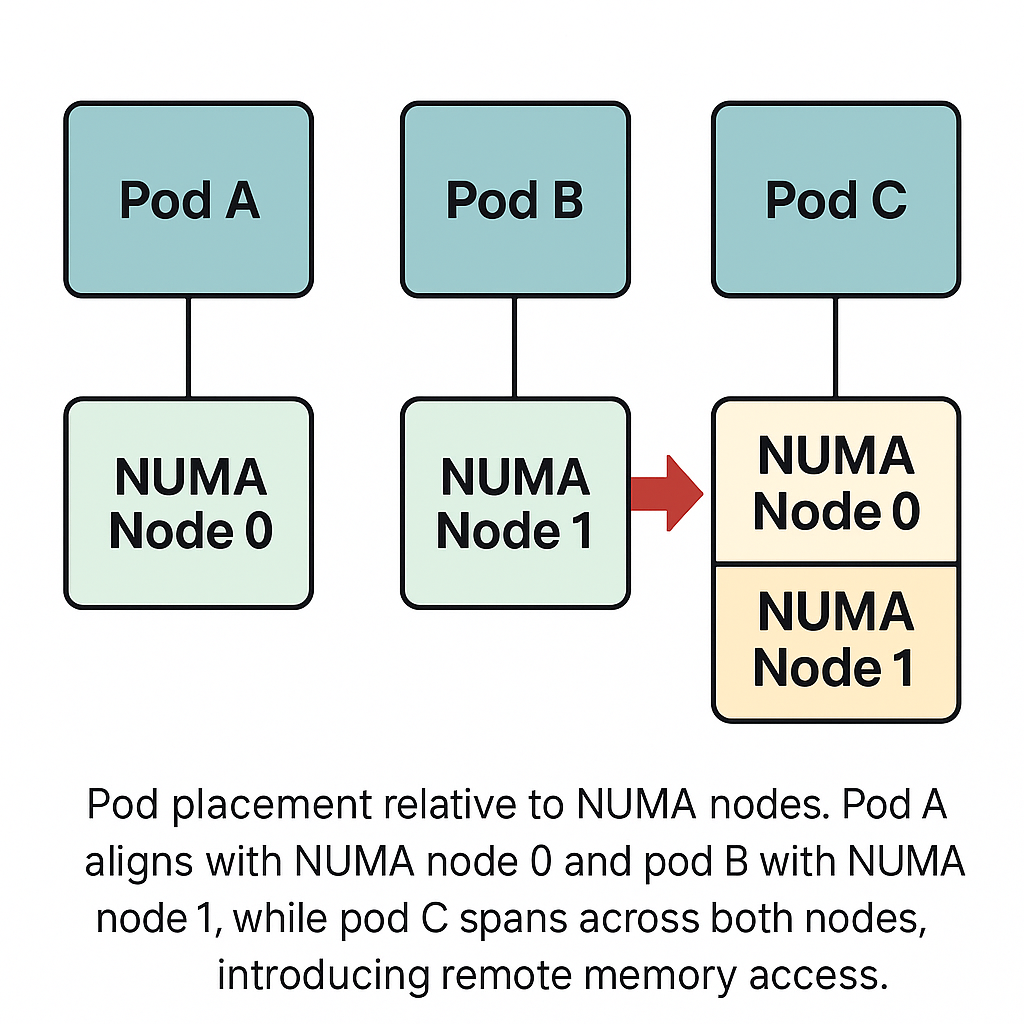
Figure 2: Pod placement relative to NUMA nodes. Pod A (orange) is scheduled with its resources confined to NUMA Node 0, and Pod B (purple) is confined to Node 1 – both achieve local memory access. Pod C (red) spans both NUMA nodes (e.g., two containers or split resources across Node 0 and Node 1), causing remote memory accesses between its components. Topology-aware scheduling aims to avoid such cross-node placements.
In this figure, Pod C’s situation is what we want to avoid: it will suffer higher latency because part of it will always be accessing memory or communicating over the interconnect (NUMA “network”) between Node 0 and 1. Kubernetes with Topology Manager in single-numa-node policy would prevent this by not admitting Pod C unless it can be fit into a single NUMA node. By contrast, Pod A and B illustrate the ideal outcome where each pod is wholly within one NUMA zone – maximizing memory locality. In a real scenario, if Pod C had a large resource request that no single NUMA node could satisfy, you have a tough choice: either allow it to span nodes (at a performance cost) or redesign the service (e.g., scale out instead of one big pod). Kubernetes gives you the knobs to prefer one behavior or the other.
Real-World Performance Gains from NUMA Awareness
The theory of NUMA locality sounds great, but what benefits can it actually bring to microservice and database workloads? In practice, leveraging NUMA-awareness can lead to substantial performance improvements, both in overall throughput and in reducing tail latency. Here are a few data points and examples:
- Cassandra (NoSQL Database) Scaling: A study presented at ICPE 2019 evaluated Apache Cassandra on a high core-count server with NUMA. In the default configuration, a single Cassandra instance was unable to fully utilize the machine – partly due to threads contending across NUMA nodes and the JVM’s memory allocator not being NUMA-aware. The researchers experimented with deploying multiple Cassandra instances on the same server, each pinned to its own NUMA node (effectively treating each NUMA node like a separate “machine” for Cassandra). The result was a near-linear scaling of throughput: two instances (one per socket) achieved 1.9× the throughput of a single instance, and with four instances (one per NUMA die in a 4-die system) they reached ~3.95× throughput (98% efficiency). At 8 instances (8 NUMA nodes across two sockets), throughput was ~7.3× the single-instance baseline (90% efficiency). These gains came without adding any new hardware – purely by re-aligning the software deployment with the NUMA topology. Perhaps more importantly, they observed that after NUMA alignment, the memory access pattern changed dramatically: the majority of memory accesses became local to each Cassandra instance’s node, and cross-socket memory traffic nearly disappeared. This not only boosts average throughput but also smooths out latency. By eliminating remote memory accesses, they removed a source of long pause times (e.g. a GC or read that no longer stalls waiting for data from another socket).
- Tail Latency Improvement: While throughput is easier to measure, tail latency (e.g. 99th percentile response time) is often the more critical metric for user-facing services. NUMA misplacement tends to disproportionately affect tail latency because only some requests get unlucky and hit the slower path (remote memory or a congested memory controller). Anecdotally, teams have found that pinning a service to one NUMA node can significantly tighten the latency distribution. For example, consider a key-value store like etcd or a sharded SQL database: if it’s running across NUMA nodes, most requests might complete in (say) 1 ms, but the 99th percentile could be 5 ms due to a few requests that invoked a remote memory access or incurred an OS NUMA migration. Once confined to one node, the 99th percentile might drop to, say, 2 ms, much closer to the average. In telco applications, Red Hat observed that keeping network I/O and processing on the same NUMA node is essential to meet strict latency SLAs – if a packet’s data has to traverse to a distant NUMA node, it “slows down how quickly information can reach the application”, and the application can fail to meet its real-time requirements. By using topology-aware scheduling, they report that high-performance telecom workloads “cannot operate to specification” unless the pod is confined to a single NUMA zone – underscoring how important this is for worst-case latency.
- Redis and In-Memory Cache Performance: As mentioned, NUMA effects have been seen in Redis and similar in-memory caches. One published tuning guide for Redis on multi-socket systems notes that binding the Redis process to a socket and its memory yields more consistent and often higher throughput, as it eliminates cross-node access which can make throughput “seem non deterministic”. When many small operations are involved (which is typical for caches), those extra ~100 ns penalties here and there can add up to measurable throughput loss. After NUMA pinning, not only does throughput improve, but the variance between runs or between different moments of the run decreases – a sign of improved determinism.
- Kernel-Level Optimizations: Even the Linux kernel’s internal performance can benefit. There have been reports of substantially improved system throughput when enabling automatic NUMA balancing for certain workloads – SPECjbb (Java middleware benchmark) saw ~30% gain on a 4-socket system when AutoNUMA was enabled, due to more memory being accessed locally. Likewise, a bug fix in OpenJDK’s NUMA allocator yielded 11% improvement in a Java workload. These kinds of gains at the lower levels translate to more headroom for applications at the higher level.
In summary, NUMA-aware placement is not just an academic concern – it yields real, tangible benefits. By treating each NUMA node as a locality domain (much like an availability zone in a distributed system), we can optimize microservice deployments for both throughput and latency. We reduce expensive remote memory accesses, keep CPU caches warmer (since a thread often runs repeatedly on the same cores with access to the same local memory), and avoid contention on interconnect bandwidth. The performance improvements can range from single-digit percentages in mild cases to nearly doubling performance in extreme cases where an workload was badly NUMA-separated and then fixed. Moreover, avoiding cross-node traffic frees up interconnect bandwidth for cases where it truly is needed (e.g., inter-process communication or remote I/O), rather than wasting it on avoidable memory accesses.
Conclusion: NUMA as a Core Part of the “Network” in System Design
As microservices and distributed systems architects, we’re accustomed to thinking about network topology – data centers, racks, clusters, and the latency/bandwidth between services. Today’s lesson is that topology matters inside the server, too. The NUMA architecture of modern servers effectively creates a network within each machine: one with very low latency and high bandwidth (local memory access) and one that is an order of magnitude slower (remote memory access over interconnect). Failing to account for this is like ignoring the difference between a service call to a process on the same host versus one across the country.
Fortunately, the software ecosystem is catching up. The Linux kernel provides mechanisms to keep tasks and memory close together, and Kubernetes is incorporating topology-aware scheduling so that your pods are placed with NUMA locality in mind. The trend is clear: NUMA-awareness is becoming a standard part of performance-sensitive computing. Just as we optimize which services talk to each other over the network (and co-locate them when possible), we must now optimize which threads use which memory within a single server.
In practical terms, when designing a high-performance microservice deployment or a stateful database cluster, you should:
- Ensure critical services are either restricted to a single NUMA node on each host or use Kubernetes policies to enforce such placement.
- Use core pinning and memory binding for latency-sensitive components (either manually with tools like
numactlor via orchestrator settings) to eliminate cross-node jitter. - Treat NUMA nodes as a scheduling dimension: e.g., it may be better to run two instances of a service on two separate NUMA nodes of one big machine (for isolation) rather than one bigger instance spanning both – analogous to running two instances on two smaller machines.
- Incorporate NUMA considerations into your observability: monitor per-NUMA-node memory usage and CPU usage. Imbalances can indicate that a process is inadvertently using remote memory, which could be optimized.
- Leverage the latest kernel and Kubernetes features: enable kubelet’s Topology Manager (with
single-numa-nodefor strict cases), use the Memory Manager for workloads like databases that benefit from guaranteed local memory, and keep an eye on upcoming features like scheduler-level NUMA awareness or eBPF-based scheduling enhancements.
Ultimately, NUMA should be viewed as part of the “distributed system”. It’s the distributed system within a single node. The same principles of locality, avoiding unnecessary hops, and reducing latency variance apply. By elevating NUMA to a first-class concern – treating a cross-socket memory access with similar gravity as a cross-service RPC – we can squeeze more performance out of our machines and deliver more predictable service latency. Modern microservices need to be topology-aware at all levels, and NUMA is now a key part of that topology. In a world where microseconds matter, the path a byte takes through memory – whether it stays on the local NUMA node or goes off-node – can be the difference between hitting your tail latency SLA or not. NUMA is indeed the new network: invisible to the end user, but critical to architects and engineers designing the systems of tomorrow.