Post
System Design Explained: A Beginner's Guide
What system design is, the building blocks every large system uses (load balancers, caches, databases, queues, CDNs), how they scale, the trade-offs between them, and how to start practising.
.png)
By Codemia • November 13, 2026
10 min read
System design is the work of deciding how the parts of a software system fit together: which servers handle requests, where the data lives, how it gets copied, what happens when traffic grows tenfold, and what happens when a machine dies. It is the layer above writing code. Code answers "how does this function work"; system design answers "how does this whole product keep working for millions of people".
This guide is for engineers who are new to the topic, whether you want to understand the systems you work on or you are preparing for a system design interview. It covers what the field is, the building blocks almost every large system uses, how those blocks scale, and the trade-offs that come up again and again.
Read it once end to end to get the map. Then pick a simple practice problem, such as a URL shortener, and try to design it yourself using the blocks below. The ideas only stick once you have used them.
What system design is, and why it matters
A small application can run on one server with one database. Nothing interesting happens until it has to do more than that machine can handle: more users, more data, more regions, or stricter guarantees about not losing anything. At that point you have to make decisions:
- Where does a request go when it arrives?
- How many copies of the data do you keep, and where?
- What do you do with work that takes ten seconds?
- Which parts can be slightly out of date, and which must always be exact?
Those decisions are system design. They matter in two places:
- At work. Senior engineers spend much of their time on these decisions, because getting them wrong is expensive to undo.
- In interviews. Most software engineering loops at mid-level and above include a system design round, where you design something like a URL shortener or a chat app in about 45 minutes.
The building blocks
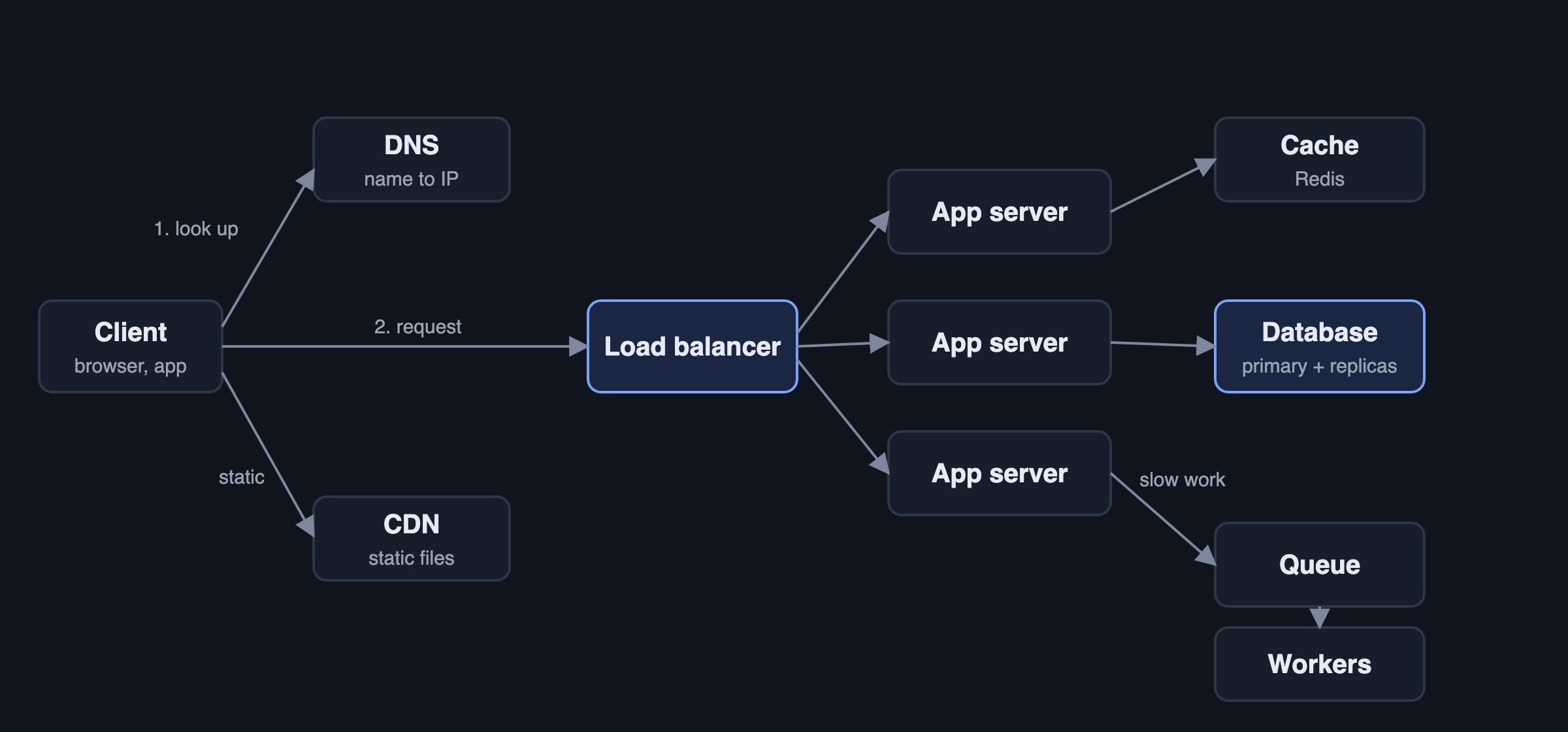
Almost every large system is built from the same handful of parts. Figure 1 shows how a typical request moves through them.
Clients and DNS
The client is whatever the user holds: a browser, a phone app, another service. Before it can send a request it needs an IP address, which it gets from DNS (the Domain Name System), the internet's phone book. DNS can also do simple routing, for example sending users in Europe to European servers.
CDN
A content delivery network keeps copies of static files (images, video, JavaScript) on servers close to users around the world. A user in Singapore downloads your logo from Singapore, not from Virginia. For media-heavy products such as video streaming, the CDN carries most of the traffic.
Load balancer
A load balancer sits in front of a group of servers and spreads requests across them. It also checks which servers are healthy and stops sending traffic to ones that fail. This is what lets you add servers as traffic grows, and lose one without users noticing.
Application servers
The app servers run your code. The key design rule is to keep them stateless: they should not store anything about a user between requests, so that any server can handle any request. Session data and anything else that must persist goes into a database or cache instead.
Databases
The database is where the data that must not be lost lives. The two broad families:
- Relational (SQL) databases such as PostgreSQL and MySQL store data in tables with a fixed schema and support transactions and joins. They are the default choice when data has relationships and correctness matters, such as orders, payments and accounts.
- NoSQL databases cover several types: key-value stores (Redis, DynamoDB), document stores (MongoDB), wide-column stores (Cassandra) and others. They usually give up some flexibility in queries in exchange for easier horizontal scaling or a better fit for a particular data shape.
A useful beginner rule: start with a relational database, and move a specific piece of data to something else only when you can name the problem it solves.
Cache
A cache keeps frequently read data in memory, so most reads never touch the slower database. Redis and Memcached are the common choices. Caching is often the single biggest performance win in a design, and also a common source of bugs, because cached data can go stale.
Message queue
A message queue (Kafka, RabbitMQ, Amazon SQS) lets one part of the system hand work to another without waiting for it. When a user uploads a video, the app server puts a "transcode this" message on a queue and returns immediately; workers pick up messages and do the slow work in the background. Queues also absorb traffic spikes: if a thousand jobs arrive at once, they wait in the queue instead of overwhelming the workers.
How systems scale
When one server is no longer enough, there are two ways to add capacity.
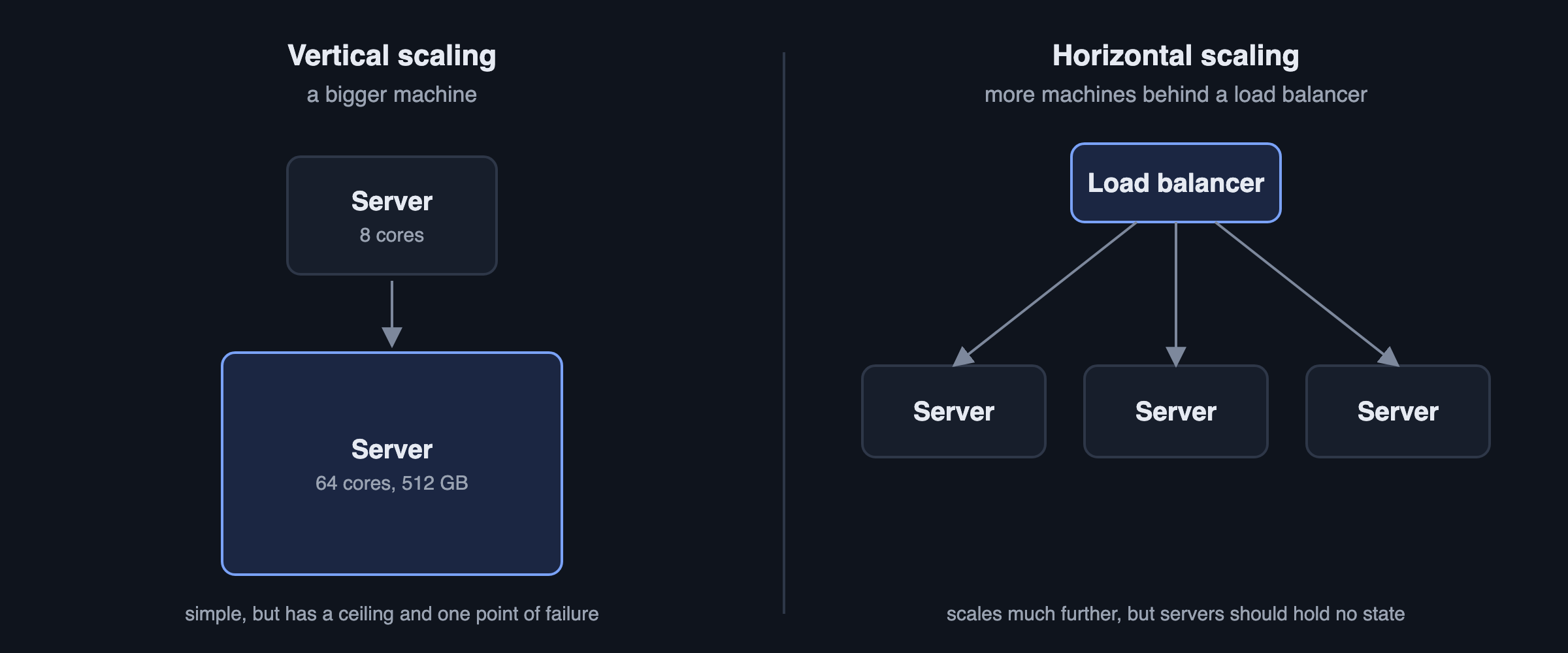
- Vertical scaling means a bigger machine: more CPU, more memory. It is simple and needs no code changes, but there is a largest machine you can buy, and that one machine is still a single point of failure.
- Horizontal scaling means more machines. It can go much further and survives individual failures, but it needs a load balancer, stateless servers, and a plan for the data.
App servers are easy to scale horizontally once they are stateless. The database is the hard part, which is where caching, replication and sharding come in.
Caching
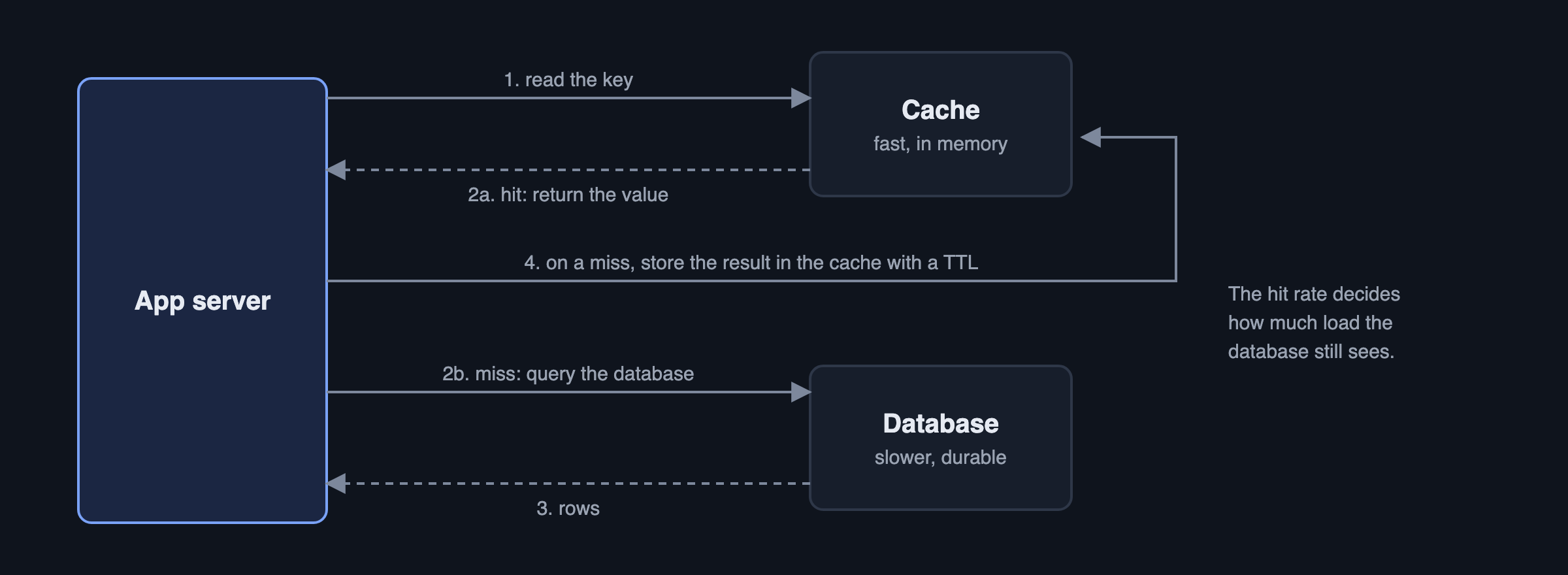
The most common pattern is cache-aside (Figure 3): check the cache, and on a miss read from the database and store the result in the cache with an expiry time (a TTL). The questions to answer whenever you add a cache:
- What happens when the data changes? Either delete the cached copy on every write, or accept that readers may see old data until the TTL runs out.
- What happens when the cache is empty, for example after a restart? All traffic hits the database at once. Systems that depend heavily on their cache need a plan for this.
- What gets evicted when memory fills up? Usually the least recently used items (LRU).
Replication and sharding
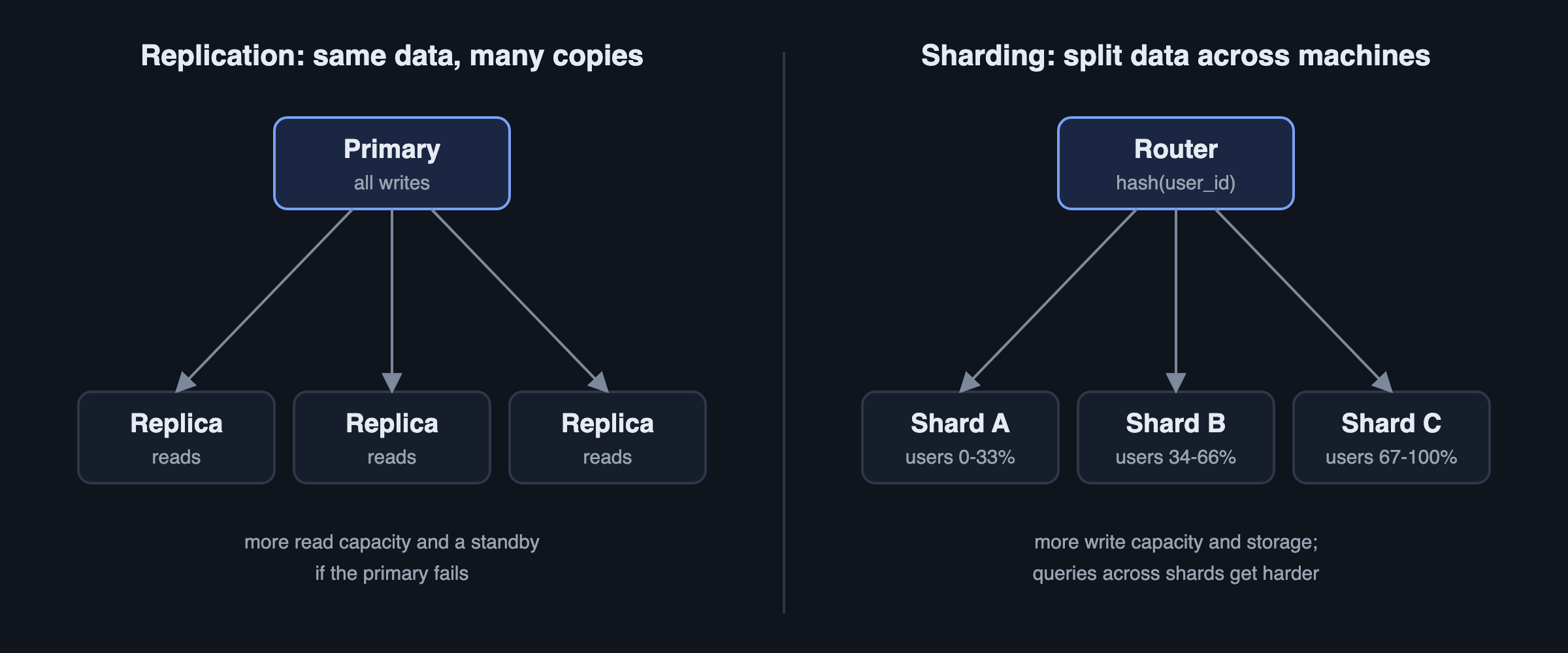
Replication keeps several copies of the same data. Typically one primary accepts writes and copies them to replicas, which serve reads. You get more read capacity and a standby that can take over if the primary fails. The catch is replication lag: a replica may be a fraction of a second behind, so a user who just updated their profile might read the old version from a replica.
Sharding (also called partitioning) splits the data across machines, for example by a hash of the user ID, so each shard holds a fraction of the users. This adds write capacity and storage, which replication cannot. The catches: picking a shard key that spreads load evenly, queries that need data from several shards, and moving data when you add shards. Consistent hashing is the standard technique for that last problem.
Most large systems use both: each shard is itself replicated.
The trade-offs that keep coming up
System design has very few right answers. It is mostly a series of trade-offs, and naming them clearly is what interviewers listen for.
Consistency versus availability
When data is copied across machines and the network between them fails, a system must choose: refuse some requests until the copies agree (consistency), or keep answering and let copies disagree for a while (availability). This is the idea behind the CAP theorem. In practice the question is per feature:
- A bank balance or a ticket seat needs strong consistency: two people must never buy the same seat.
- A like count or a news feed can be eventually consistent: if a like shows up a second late, nobody is harmed.
Latency versus throughput
Latency is how long one request takes; throughput is how many requests the system handles per second. Batching work improves throughput but adds latency; caching usually improves both. Know which one your feature cares about.
SQL versus NoSQL
Choose based on the data and the queries, not fashion. Relationships and transactions point to SQL. Very high write volume with simple lookups by key, or flexible document shapes, can point to NoSQL.
Push versus pull
Should a new post be pushed into every follower's feed when it is written (fast reads, expensive writes), or assembled when someone opens their feed (cheap writes, slower reads)? Many real feeds use both: push for most users, pull for accounts with millions of followers.
Synchronous versus asynchronous
Doing work during the request gives the user an immediate result; handing it to a queue makes the request fast and the system more resilient, at the cost of the result arriving later. Anything slow, retriable or spiky (emails, video processing, notifications) usually belongs on a queue.
Numbers worth knowing
Rough estimates turn vague designs into concrete ones. A few useful facts:
- There are about 86,400 seconds in a day, so 1 million requests per day is roughly 12 requests per second on average. Peaks are often several times the average.
- Reading from memory takes on the order of 100 nanoseconds; a round trip within a data centre about 0.5 milliseconds; a round trip across continents 100 milliseconds or more.
- A single well-tuned relational database server can handle a few thousand to tens of thousands of simple queries per second, depending heavily on the queries and hardware.
- Storage adds up fast: 10 million new 1 KB records a day is about 10 GB a day, or around 3.6 TB a year.
You do not need exact numbers in an interview. You need numbers good enough to change a decision, such as "this will not fit on one machine, so we shard".
How a system design interview works
A typical round is 45 to 60 minutes and follows a predictable shape:
- Requirements (about 5 minutes). Ask what the system must do and at what scale. Do not start drawing yet.
- Estimates (about 5 minutes). Requests per second, storage, read to write ratio.
- API and data model (about 5 minutes). The main endpoints and tables.
- High level design (about 15 minutes). The diagram, built from the blocks above. Walk a request through it.
- Deep dives (about 15 minutes). The interviewer picks, or you propose, the hardest parts: the bottleneck, a failure case, the consistency question.
Interviewers are not looking for one correct architecture. They want to see you make reasonable decisions, explain why, and adapt when they push back.
How to start practising
Reading builds vocabulary; practice builds the skill. The fastest path from here:
- Try one easy problem today. A URL shortener uses almost every block in this guide: a database, a cache, ID generation and a read-heavy workload. Set a 45 minute timer and design it before reading any solution.
- Work through a ranked list. System design practice problems, from easy to hard orders 41 problems by difficulty, with what each one teaches.
- Follow a plan. How to practise system design: a 4-week plan turns that list into a schedule.
- Take a structured course if you prefer. The free System Design Fundamentals course covers these building blocks in more depth, one lesson at a time.
The Codemia system design catalogue has 120+ problems you can design in an editor and on a whiteboard, with AI grading against each problem's key points.